Have you ever received a message in your Facebook Business Page saying your account is being deactivated? Here’s an example of a message a spam bot could send to your Facebook Messenger:
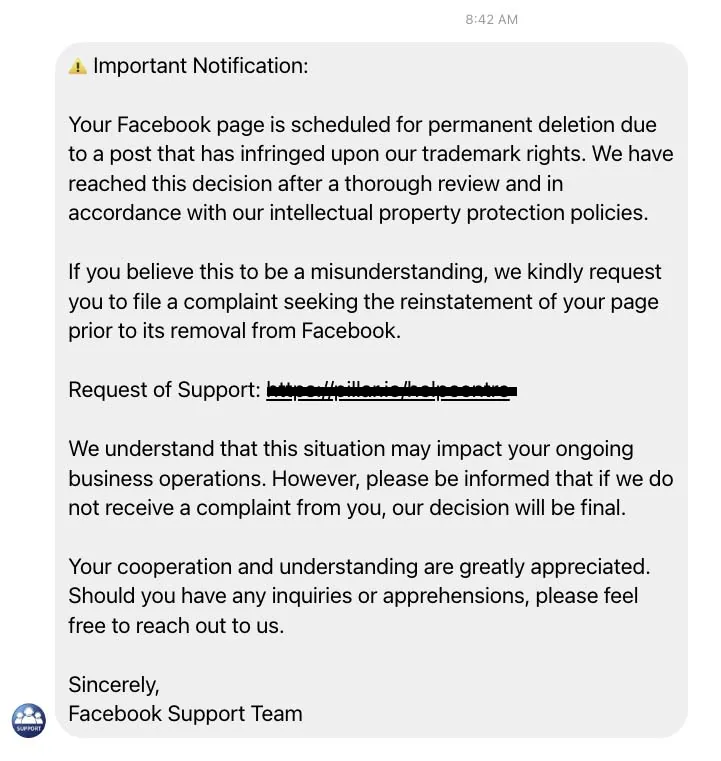
Here’s some valuable guidance directly from the Facebook Help Center:
Protect yourself from phishing on Facebook
About phishing
Phishing is when someone tries to get access to your Facebook account by sending you a suspicious message or link that asks for your personal information. If they get into your account, they may use it to send spam.
Example of phishing: Joey gets an email saying he needs to log into his Facebook account to read an important message about his account. The email links to a website that isn’t a Facebook website. Then he’s asked to enter his username and password.
How to identify suspicious emails or messages
If you can recognize suspicious messages or emails, you may be able to avoid phishing scams.
Don’t trust messages that:
- Demand money
- Offer gifts
- Threaten to delete or ban your Facebook account
Emails about your account always come from:
- fb.com
- facebook.com
- facebookmail.com
You can always visit facebook.com or open the Facebook app to check for important messages.
Don’t click suspicious links. If you get a suspicious email or message claiming to be from Facebook, don’t click any links or attachments.
Don’t respond to these emails. Don’t answer messages that ask for your:
- Password
- Social Security number
- Credit card information
Stay safe online! Contact us if you need help managing your online profiles or your website.

About the author
Leighton Smith is Pioneer Media’s website designer, web developer and webmaster, based in East Tennessee. As a solopreneur, he is each client’s one point of contact and has built hundreds of websites since learning to code in 2006.